
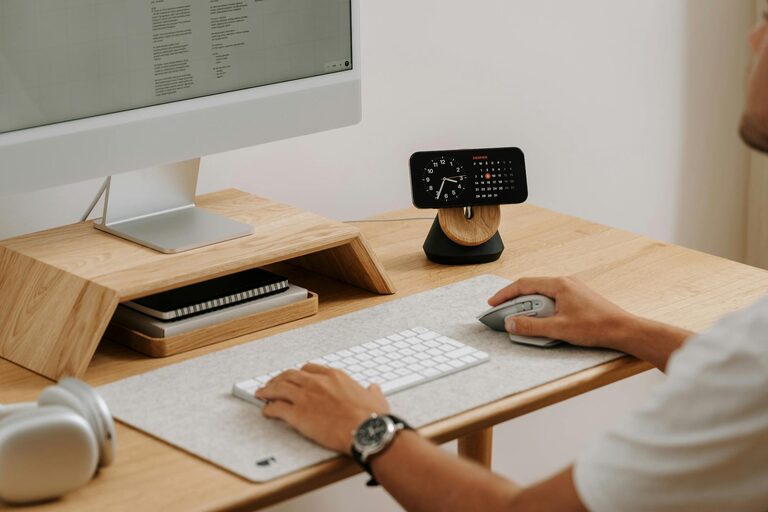
Creating a productive home office environment is essential for anyone working remotely or managing tasks from home. An organized workspace not only helps reduce clutter but also enhances focus and efficiency. If you’re looking to maximize productivity in your home office, here are some actionable tips and ideas to help you organize your space effectively.
1. Choose the Right Location
Before diving into organizing, select a spot in your home that minimizes distractions and has a comfortable atmosphere. Ideally, pick an area with:
– Natural light to improve mood and reduce eye strain
– Enough space for your desk, chair, and storage
– Quiet surroundings to help you stay focused
If space is limited, consider transforming a corner of a quiet room or using a room divider to create a separate workspace.
2. Invest in Comfortable and Functional Furniture
A comfortable and ergonomic setup can prevent fatigue and improve productivity. Consider the following:
– Ergonomic chair: Supports your back and encourages good posture
– Appropriate desk height: Make sure your desk is at a comfortable height to reduce strain on wrists and shoulders
– Adjustable monitor stand or laptop riser: Keeps your screen at eye level to avoid neck pain
Investing in quality furniture might feel like a big step, but it pays off in increased comfort and efficiency.
3. Declutter and Minimize Distractions
A cluttered workspace can distract your mind and reduce productivity. Here’s how to keep clutter at bay:
– Sort through your items regularly: Keep only what you need daily on your desk
– Use trays or desk organizers: Separate papers, pens, and gadgets to avoid mess
– Keep personal items to a minimum: Family photos or plants are fine, but too many items can be distracting
When not in use, put away items to maintain a clean and clear workspace.
4. Organize Your Digital Workspace
Your home office isn’t just physical; your digital workspace also needs organization. Try these methods:
– Organize files into folders: Use meaningful folder names to find files quickly
– Clean up your desktop: Avoid storing numerous icons and files on your computer’s desktop
– Use productivity apps: Tools for task management, calendars, and note-taking can help you stay on track
Backing up important files regularly is also a good habit to protect your work.
5. Maximize Storage Solutions
Storage keeps your supplies, documents, and equipment tidy. Some practical ideas:
– Shelving units: Use vertical space with shelves for books, binders, or organizers
– Drawer organizers: Keep small items like paper clips, sticky notes, or chargers sorted
– Filing cabinets or boxes: Store important documents clearly labeled and easy to access
Label everything so you can quickly find what you need without wasting time searching.
6. Manage Cables and Tech Setup
Cables can quickly turn your neat space into a tangled mess. Organize your electronics by:
– Using cable clips or ties to bundle cables together
– Hiding cables behind your desk or along walls with cable covers
– Keeping charging stations in one designated area
A tidy tech setup helps maintain a stress-free environment and reduces the risk of accidents.
7. Enhance Your Lighting
Proper lighting reduces eye strain and keeps you alert. Tips for good lighting include:
– Taking advantage of natural daylight whenever possible
– Using a quality desk lamp with adjustable brightness
– Considering soft, warm lights to create a relaxing atmosphere
Avoid harsh overhead lights or glare on your screen to maintain comfort during work hours.
8. Personalize With Purpose
Adding personal touches can make your home office a pleasant place to spend time, but keep it purposeful:
– Incorporate plants to improve air quality and add life to the room
– Display motivational artwork or quotes that inspire focus
– Use colors that energize or calm you, depending on your preferences
Balance personalization with simplicity so your space remains functional.
9. Establish Daily and Weekly Routines
An organized office is only effective when maintained regularly. To keep your space in order:
– Set aside 5-10 minutes at the end of each day to tidy your desk
– Review and organize files or to-dos weekly
– Adjust your setup as needed to suit changing work demands
Routines help create habits that support ongoing productivity.
Conclusion
Organizing your home office is more than just tidying up — it’s about creating a welcoming and efficient environment that supports your work goals. By selecting the right location, investing in ergonomic furniture, minimizing clutter, and managing both physical and digital spaces, you can significantly improve your productivity. Remember, a few thoughtful changes can make a big difference in how you feel and perform while working from home. Start organizing today and enjoy a more focused and enjoyable workday!